


Videos and user manual > 7.1. AI Helpers
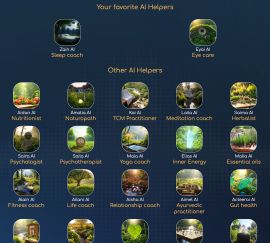
One of the most exciting developments in BioCoherence is the introduction of AI Helpers. These AI-driven assistants are designed to help users navigate the vast amount of information within the app, making it easier to understand and utilize the data from their biofeedback scans.
The AI Helpers in BioCoherence are designed to enhance user experience by providing tailored guidance, explanations, and program creation based on user data. These AI modules reduce the learning curve for new users and offer professionals a way to streamline client interactions. AI Helpers can operate in two distinct modes depending on the context of their use:
- Without a Recording: Users can chat with the AI to create a basic program based on their needs. From the Homepage: Users can interact with the AI for general guidance without linking to specific biomarkers.
- With an Open Recording: AI Helpers analyze the user's biomarkers and provide insights or recommendations based on the recorded data.
Key Features
The AI Helpers function as a virtual clinic, with specialized assistants acting as nurses and support staff for both general users and professional practitioners. These AI assistants can:
- Read and interpret biomarkers from your scans and the scans of your clients.
- Show specific biomarkers and interpret its values.
- Play harmonic boosts to help balance your energy.
- Modify your priorities based on your health data and the discussion.
- Add elements to your harmonic boost list for personalized healing.
- Request and analyze new tests in real-time.
- Provide explanations and advices for various biomarkers and test results.
- Redirect clients to professional consultations when needed.
- Tailored Assistance: Each AI Helper specializes in a specific domain, such as naturopathy, Traditional Chinese Medicine (TCM), essential oils, or meditation. There are currently more than 25 AI Helpers. They receive a curated subset of biomarkers relevant to their expertise, specific crafted prompts, specific knowledge and training, specific lists and list items, specific additional information and specific abilities.
- Basic Program Creation: Users can create personalized programs by discussing their needs with the AI. These programs are saved in the "Basic Programs" section and can be launched immediately.
- Language Support: AI Helpers support multiple languages, allowing users to interact in their native language. The system is designed to handle multilingual queries effectively.
- Customizable Access: Professionals can control which AI Helpers are available to their clients and what data they can access. This ensures that the AI operates within the boundaries set by the professional.
The AI is designed to acknowledge its limitations, ensuring that users are encouraged to seek professional guidance when necessary.
AI Helpers for Professionals
For practitioners, the AI Helpers serve as intelligent assistants that can:- Help explain complex biomarkers to clients.
- Suggest additional tests based on client data.
- Recommend meditation techniques or herbal remedies.
- Alleviate the explanation process by providing selected AI Helpers to the client with abilities to explain but not modify the Pro's decisions.
When a Pro works on a client's record, the AI Helper receives the client data and acts as the Pro's assistant.
Accessing AI Helpers
AI Helpers can be accessed from:- The Homepage: For general guidance or Basic Program creation.
- An Open Recording: To analyze and explain specific biomarkers, to provide detailed insights into the analysis.
AI Helper Use Cases
Creating a Basic Program:- Navigate to the AI Helpers section from the homepage.
- Select an AI Helper (e.g., Sleep Coach, Meditation Guide).
- Engage in a conversation to describe your needs (e.g., "I feel stressed and need help relaxing").
- The AI will generate a tailored basic program and save it in your "Basic Programs" section.
- Open a recording and navigate to the AI Helpers section, under "Conclusions".
- Select an AI Helper relevant to the biomarkers you wish to explore (e.g., TCM Practitioner for meridians).
- The AI will provide detailed explanations and recommendations based on your biomarkers computed in the recording.
AI Helper Limitations
- AI Helpers cannot modify recordings or analysis results. They are designed to explain and provide guidance based on existing data.
- The initial set of biomarkers provided to each AI Helper is limited to their domain of expertise. However, the AI can request additional biomarkers during the conversation if needed.
Advanced Features
Summary and Report Integration:- At the end of a conversation, the AI Helper generates a summary of the discussion.
- Professionals can choose to include this summary in the client's PDF report for future reference.
- After each interaction, users can rate the AI Helper's usefulness and success in addressing their query. This feedback helps improve the AI's performance.
- Professionals can enable or disable specific AI Helpers for their clients.
- They can also control whether clients have access to features like the personal guide, harmonic boosts, or the full report.
Technical Notes
- AI Helper Data Handling: Each AI Helper receives between 5% and 10% of the user's biomarkers, depending on its domain. This ensures focused and relevant guidance.
- AI Helpers are tools based on large language models and their responses are not vetted by medical professionals. The accuracy of the answers should always be verified.
- 26 AI Helpers are available today but now that the system is running, it is quite easy to add new helpers; please contact us if you see any field that you would add to the AI Helpers.
Conclusion
The AI Helpers in BioCoherence are a powerful tool for both professionals and individual users. By leveraging advanced AI capabilities, they simplify complex analyses, provide actionable insights, and create personalized programs tailored to user needs. As the system evolves, new features and improvements will continue to enhance the user experience.|
|
>> Next chapter: 8. Balance
|