


Videos and user manual > 2.6. Prevalence
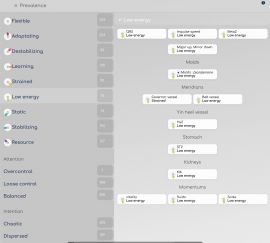
This screen allows to see at a glance all biomarkers in a specific state:
- by petal state (flexible, adapting, low energy, resource...)
- by quality (attention, intention, horizon)
The main page show the number of biomarkers in each state; click on it to list the related biomarkers.
You can filter the biomarker categories with the selector in the menu. For instance, you can show only organ prevalences, or points in a specific meridian, or drives (emotions).
Prevalence can be useful to get a quick overview at a glance, and to see the progression across several re-evaluations in a record.
|
|
>> next: 2.7. Polygraph

|
