
Modules overview2. Scan: organ maps


Dozens of exclusive, beautifully drawn body maps have been designed for BioCoherence so that navigation and links become easy to see and understand.
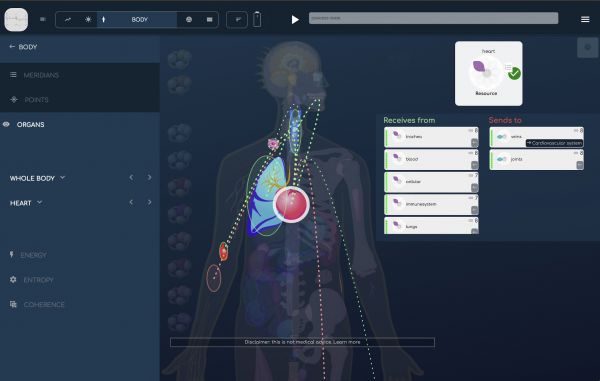
With close to 500 biomarkers dedicated to organ systems, organs or organ parts, we felt we had to map everything in order to make sense of it.
If you click on an organ, or select it from the menu list, it is surrounded by a white halo, and the main links with the other organs on this screen are displayed (they are circled in red if they receive energy from the selected organ, and in green if they send energy to it).
If links exist with organs that are detailed on other body maps, they are identified by the name of that map on a black background; clicking on it will open that detailed map.
- A dozen beautifully crafted maps for a general view or zooms into Teeth, Vertebrae, Nerves, Brain...
- One of the core features of BioCoherence is the 3rd order information Links between biomarkers. Each map beautifully highlights the links between organs on the map, or links in one click to organs on other maps.
- The visual links and the two columns allow to immediately assess the energetic relationships with other organs (receives from, or sends to)
- The selector on the left lists all organs on this map, along with their biomarker evaluation.
Opening the module
By clicking on "Body" then "organs", the module opens with a general overview of the body, including a selection of the most important biomarkers: main organs, main hormones, main parts of the locomotor system, blood, cells.If you click on an organ, or select it from the menu list, it is surrounded by a white halo, and the main links with the other organs on this screen are displayed (they are circled in red if they receive energy from the selected organ, and in green if they send energy to it).
If links exist with organs that are detailed on other body maps, they are identified by the name of that map on a black background; clicking on it will open that detailed map.
|
|
|
